Overview
Bridging Technical Vision and Team Understanding: A Dynamic Learning Analytics Prototype
Challenge
Throughout the discovery phase of a recent intervention development, I struggled to communicate the value of advanced learning analytics to my cross-functional team. We were looking to pilot test a dynamic quiz experience that would leverage xAPI (Experience API) to capture learning data and integrate generative AI for adaptive questioning to replace static quizzes in an existing course with less than stellar final exam pass rates. While I have extensive experience in learning analytics, my teammates were only familiar with basic web analytics like page views and click tracking.
This communication gap was more than just a technical misunderstanding. I needed team buy-in to move forward with this solution, but traditional documentation methods weren't working. Figma data flows and diagrams failed to convey how investing in learning analytics infrastructure would transform our approach to personalized education.
The core challenge was demonstrating how xAPI differs from course analytics by tracking learning behaviors rather than just course interactions, and showing how this data could drive truly adaptive, competency-based learning experiences.
My Approach
Rather than continuing to refine static documentation, I shifted to building a working prototype that would let my team experience the concept firsthand. It was intimidating and I wasn’t sure I’d be able to pull it off, but the potential gain ultimately made me want to explore the possibility. Using HTML, CSS, and JavaScript, I successfully created a functional dynamic quiz demo focused on US Mountain Ranges (a topic with broad appeal across our geographically distributed team).
Key Features
- 10-question initial assessment with each question labeled by Bloom's Taxonomy level and learning competency
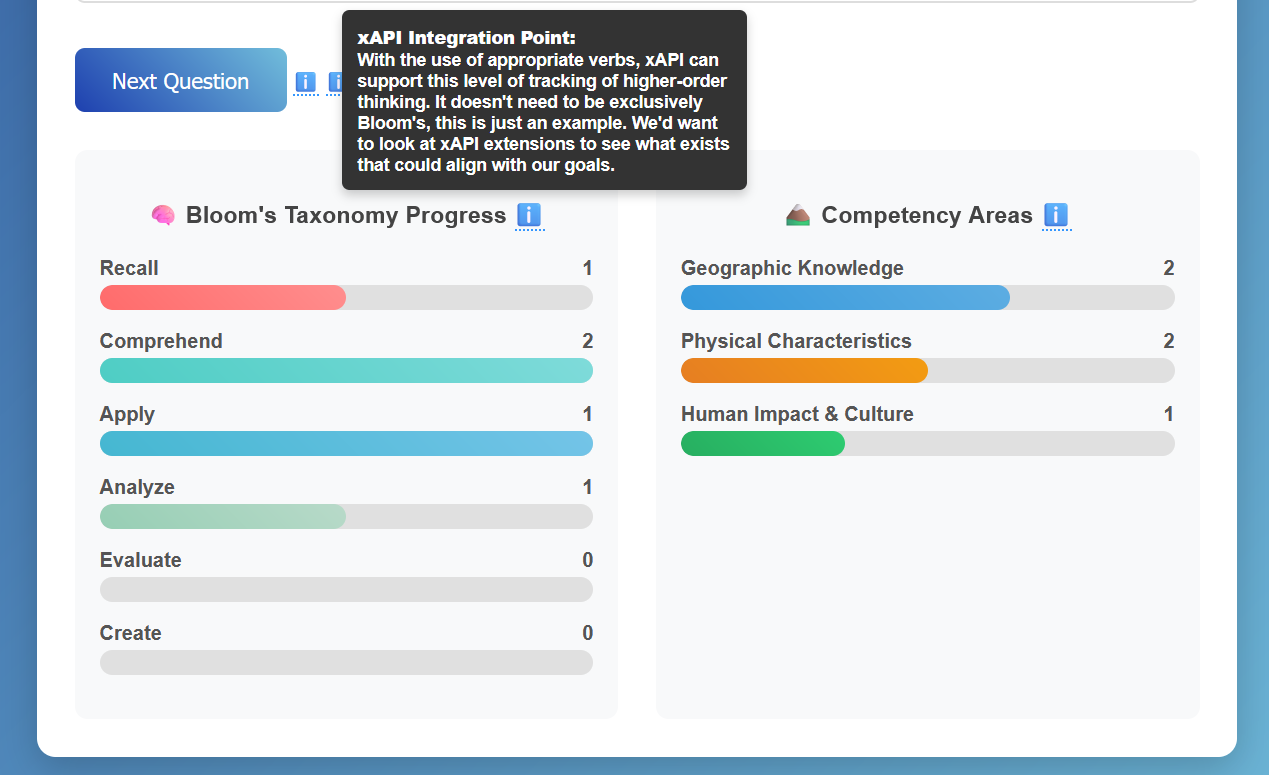
- Real-time progress tracking showing competency and cognitive skill development as users answer questions
- Adaptive follow-up system that identifies missed competencies and serves targeted practice questions
- Strategic annotations using tooltips to highlight where xAPI data capture and AI-generated questions would enhance the experience
- Lightweight dashboard demonstrating learning transparency for students
I chose vanilla web technologies for rapid development and easy hosting via GitHub Pages, allowing immediate team access without technical barriers.
Leveraging AI for Rapid Prototyping
To accelerate development, I strategically used generative AI tools to:
- Generate starter code structures for the quiz logic and progress tracking components
- Create realistic question datasets with proper Bloom's taxonomy categorization and competency mapping
- Develop interactive UI elements like the real-time progress bars and tooltip annotations
Impact & Outcomes
The breakthrough came when my teammates saw the real-time progress bars update as they answered questions. Watching competency levels rise and seeing questions explicitly connected to learning objectives created the "aha moment" I'd been working toward.
This interactive experience finally helped them understand:
- How learning analytics differs from basic course tracking
- Why xAPI investment would enable personalized learning at scale
- How transparent progress tracking answers students' "why does this matter?" questions
- The practical applications for our LMS integration
Results
The team is now moving forward with building the backend infrastructure I specified, using this prototype as our front-end foundation. More importantly, they feel confident explaining the value add of xAPI, and guiding implementation decisions.
Reflection
This experience transformed my approach to both technical communication and AI-assisted development. Taking time to build interactive artifacts rather than pushing forward with traditional documentation ended up being far more effective for this complex concept communication. Additionally, I discovered how AI tools can serve as powerful development accelerators when used strategically, allowing me to prototype ideas quickly and focus on higher-level problem solving. The investment of 1-2 days created alignment that weeks of diagrams couldn't achieve.